> ## Documentation Index
> Fetch the complete documentation index at: https://ship.paralect.com/docs/llms.txt
> Use this file to discover all available pages before exploring further.
# Scheduler
> One file pairs a cron schedule with its handler. Drop it in a resource's crons/ folder and it runs — including from plugins.
Ship runs scheduled work as part of the API. A cron job is **one file** that pairs a cron expression with a handler, defined with the `scheduler({ cron, handler })` factory and auto-discovered from any resource's `crons/` folder — so a plugin adds scheduled work exactly the way it adds an endpoint.
## Define a cron job
```ts theme={null}
// apps/api/src/resources/invite-tokens/crons/cleanup-expired.ts
import scheduler from '@/scheduler';
import db from '@/db';
export default scheduler({
cron: '0 * * * *', // every hour, on the hour
handler: async () => {
await db.inviteTokens.deleteMany({ where: { expiresAt: { lte: new Date() } } });
},
});
```
The schedule and the work live together — no separate cron registry, no event names to keep in sync. The handler runs in the API context, so it has full access to `@/db`, services, and everything else.
## Where cron files live
Cron files are owned by the resource they belong to:
```
resources/invite-tokens/
invite-tokens.schema.ts
endpoints/
crons/
cleanup-expired.ts # ← auto-registered
```
Every `**/crons/*.ts` default export is collected when the scheduler process starts and registered with [node-schedule](https://www.npmjs.com/package/node-schedule) — the same filesystem-driven wiring as [endpoints](/docs/api-reference/routing/overview). There is no central list to edit.
```mermaid theme={null}
flowchart LR
A["resources/*/crons/*.ts
scheduler({ cron, handler })"] --> B[Scheduler process]
B -->|registers each| C[node-schedule]
C -->|on tick| D["handler → @/db, services"]
```
## Add a cron from a plugin
Because discovery is by file path, a plugin just ships a `crons/` file in one of its resources:
```ts theme={null}
// plugins/billing/api/resources/subscriptions/crons/sync-invoices.ts
import scheduler from '@/scheduler';
import { syncInvoices } from '../methods/sync-invoices';
export default scheduler({
cron: '*/15 * * * *', // every 15 minutes
handler: syncInvoices,
});
```
When the plugin merges into a project, its cron files are picked up automatically — no scheduler wiring to touch.
## Run the scheduler
```bash theme={null}
pnpm --filter api schedule # production
pnpm --filter api schedule-dev # local, watch mode
```
`pnpm start` runs the scheduler alongside the API and web app. In production it runs as its own process from the API image (`apps/api/Dockerfile.scheduler`), started **after** the [Migrator](/docs/migrator) so it always works against an up-to-date schema — see [deployment](/docs/deployment/digital-ocean-apps).
## Cron format
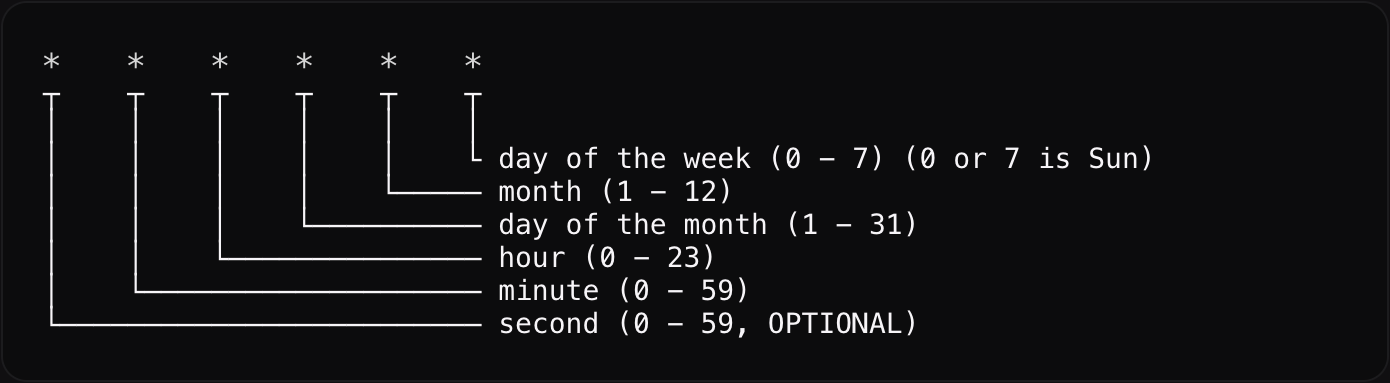
The `cron` field is a standard five-field cron expression:
 | Expression | Runs |
| -------------- | --------------------- |
| `* * * * *` | every minute |
| `*/15 * * * *` | every 15 minutes |
| `0 * * * *` | every hour |
| `0 0 * * *` | every day at midnight |
| `0 9 * * 1` | every Monday at 09:00 |
Keep handlers idempotent and quick, and always let errors surface to the logger. For long or heavy work, have the cron enqueue it or emit a [mutation event](/docs/api-reference/using-events) and do the work elsewhere.
| Expression | Runs |
| -------------- | --------------------- |
| `* * * * *` | every minute |
| `*/15 * * * *` | every 15 minutes |
| `0 * * * *` | every hour |
| `0 0 * * *` | every day at midnight |
| `0 9 * * 1` | every Monday at 09:00 |
Keep handlers idempotent and quick, and always let errors surface to the logger. For long or heavy work, have the cron enqueue it or emit a [mutation event](/docs/api-reference/using-events) and do the work elsewhere.